Google Search Console Introduces Web Multimodal Search Performance Reporting
Google Search is changing rapidly. People are no longer relying only on traditional text-based searches to discover information, products, services, and websites. Today, users can search using images, screenshots, smartphone cameras, and visual elements.
To help website owners understand this changing search behavior, Google has introduced web multimodal Search performance reporting in Google Search Console.
The new reporting gives website owners and SEO professionals additional insight into how their content performs when people use multimodal search experiences, including searches initiated through images.
According to Google, the new data is being integrated into the Performance report for Search results as well as the Generative AI features performance report.
What Is Web Multimodal Search?
Traditional search generally starts with a user typing words into a search box.
For example:
“Best running shoes for beginners”
Multimodal search works differently.
Instead of typing a complete query, a user can provide Google with an image, camera input, screenshot, or visual reference and ask Google to understand or search for information related to it.
For example, a user might:
- Take a picture of a dress and search for similar products.
- Upload an image of a product to find information about it.
- Use their smartphone camera to identify an object.
- Circle something on their Android phone and search for it.
- Right-click an image in Chrome and search for that image.
These experiences allow users to combine visual information with search technology.
This is why multimodal search is becoming increasingly important for websites that depend on images, products, visual content, and discovery through Google.

What Has Google Announced?
Google has added multimodal search reporting to Search Console.
The new reporting allows site owners to understand performance associated with searches that originate from visual or image-based interactions.
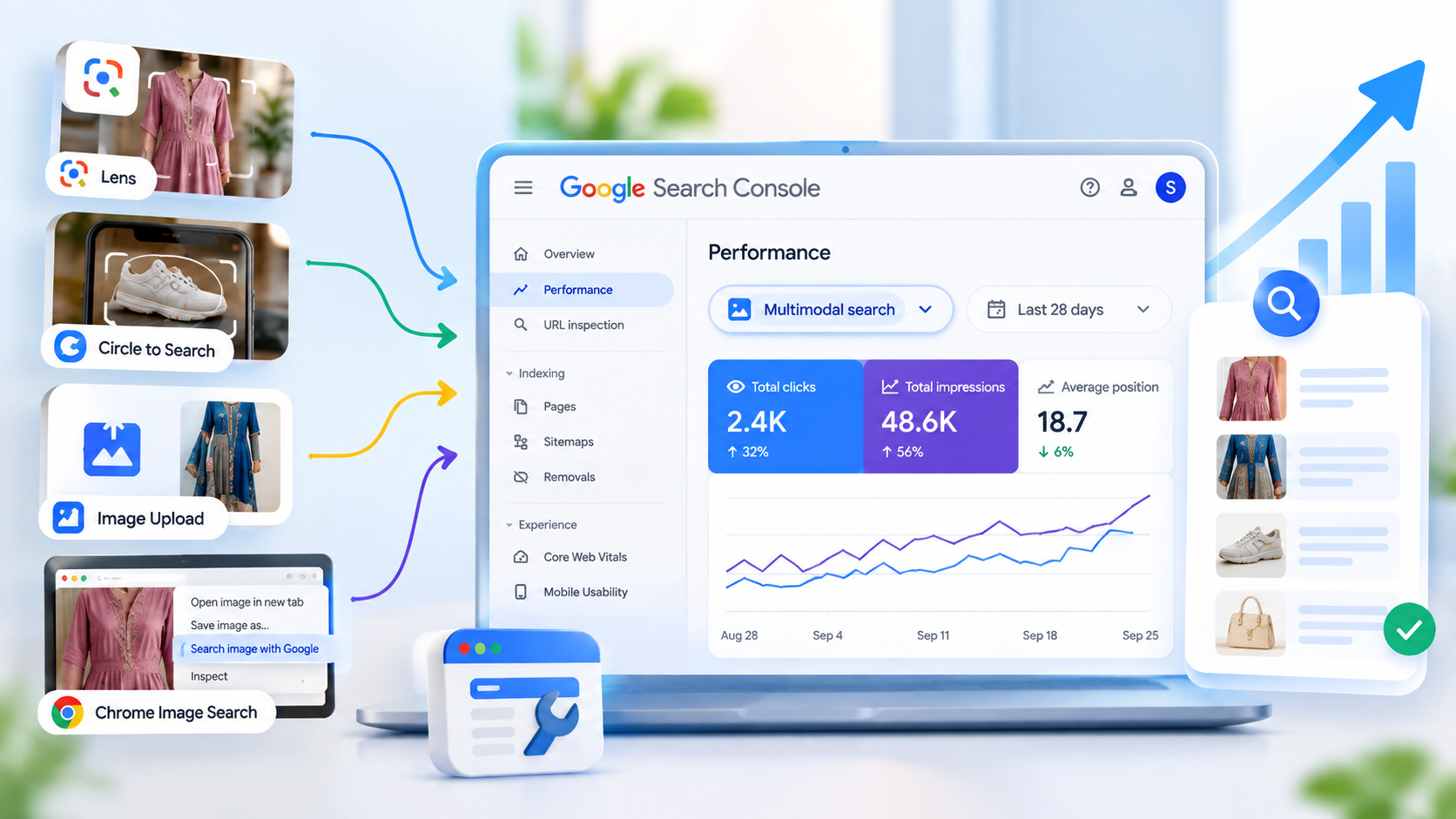
Google specifically mentions data from:
- Google Lens
- Circle to Search on Android
- Image uploads to Google Search
- Chrome’s “Search this image” feature
This data can now be analyzed through a new multimodal search type filter in Search Console’s Performance reports.
This is particularly useful because website owners can now get more visibility into how their content is discovered through visual search behavior.
Why Is This Important for SEO?
For many years, SEO strategies focused heavily on keywords, text content, backlinks, technical SEO, and traditional Google Search results.
Those factors remain important, but search behavior is becoming more visual.
Consider an online fashion store.
A potential customer might see a particular suit design on social media or somewhere online. Instead of typing:
“Punjabi suit with embroidery”
the customer may simply upload or search using the image.
Google can then use visual understanding to help the user discover related information.
For businesses selling:
- Clothing
- Jewellery
- Furniture
- Shoes
- Electronics
- Home décor
- Food
- Beauty products
- Artwork
- Travel experiences
visual discovery can be particularly relevant.
The new Search Console reporting gives businesses another way to understand whether their content is appearing through these kinds of searches.
Which Google Features Are Included?
Google says the new multimodal search reporting includes several ways users can initiate visual searches.
1. Google Lens
Google Lens allows users to search using images and camera input.
For example, someone can take a photograph of:
- A dress
- A plant
- A product
- A landmark
- A piece of furniture
and use Google to find related information.
For websites with strong visual content, Lens can create an additional discovery pathway.
2. Circle to Search
Circle to Search allows Android users to select something visible on their screen and search for it.
A user might circle:
- A product
- A clothing item
- A pair of shoes
- A landmark
- An object in an image
and then search for information about that visual element.
Google’s new reporting includes relevant multimodal search activity from Circle to Search on Android.
3. Image Uploads to Google Search
Users can also upload images to Google Search.
Instead of explaining something with words, they can provide an image and allow Google to interpret it.
This can be especially relevant to visual industries.
For example:
User uploads an image of a suit → Google understands the visual query → relevant web content may appear.
This makes high-quality images increasingly important for businesses that depend on product discovery.
4. Chrome “Search This Image”
Google also includes searches initiated through Chrome’s “Search this image” functionality.
This gives users another way to investigate an image they encounter online.
For publishers and businesses, this means images can potentially become another entry point into their website.
Where Can You Find the New Data?
The new reporting is available through Google Search Console’s performance reporting.
Google says users can access these insights using the new multimodal search type filter.
The Performance report already provides important SEO metrics such as:
- Clicks
- Impressions
- Average position
- Queries
- Pages
- Countries
- Devices
The new filter adds another way to segment Search performance based on multimodal search activity.
How to Analyze Multimodal Search Performance
Suppose you run an online clothing store.
You have 500 product pages and thousands of product images.
Previously, you might analyze:
Organic Search → Queries → Clicks → Impressions
Now you can also investigate performance associated with multimodal searches.
You can ask questions such as:
- Are users discovering my products through visual searches?
- Which pages receive multimodal-search impressions?
- Which product categories appear most frequently?
- Are my visual assets helping users discover my website?
- Are impressions increasing over time?
- Which pages should receive better image optimization?
This gives SEO teams another layer of search-performance data.
Multimodal Search and E-Commerce
E-commerce websites may be among the businesses that can benefit significantly from understanding visual search.
Imagine an online suit store.
A product page could contain:
Product: Designer Punjabi Suit
Images:
- Front view
- Back view
- Close-up embroidery
- Fabric detail
- Model wearing the suit
- Dupatta detail
A customer who discovers a similar visual design through Google could potentially find related web content.
This makes product photography more than just a design element.
It can become part of the website’s search-discovery strategy.
What Does This Mean for Image SEO?
The announcement doesn’t mean that simply uploading more images will automatically generate more traffic.
Instead, website owners should think about the overall quality and usefulness of their visual content.
Important areas include:
1. Use Relevant Images
Images should accurately represent the page and its content.
For example, a product page for a blue embroidered suit should contain clear images of the actual product.
2. Optimize Image Context
The surrounding page content should clearly explain what the image represents.
For example:
Poor context:
IMG_2389.jpg
Better context:
Blue embroidered Punjabi suit with organza dupatta
The page should provide useful information rather than relying solely on the image itself.
3. Use Descriptive File Names
Instead of:
IMG12345.jpg
consider something descriptive such as:
blue-embroidered-punjabi-suit.jpg
This isn’t a guarantee of rankings, but it creates clearer context for humans and search systems.
4. Add Useful Alt Text
Alt text should describe the image appropriately and naturally.
For example:
“Blue embroidered Punjabi suit with matching dupatta”
Avoid stuffing keywords into alt text unnaturally.
5. Maintain High-Quality Product Photography
For e-commerce websites, clear product photography can improve the user experience and make the product easier to understand visually.
Multimodal Search Is Not the Same as Image Search
One important distinction is that multimodal search and traditional Google Image Search are not necessarily the same thing.
Google Search Console already separates different search types, including Web, Image, Video, and News.
The new multimodal reporting focuses on searches where users use visual input to initiate or interact with search.
This provides another perspective on how users discover web content.
Therefore, marketers shouldn’t simply treat the new report as another version of the Image Search report.
What Metrics Should SEO Professionals Watch?
The most useful starting points are likely to be:
Impressions
Impressions indicate how often links to your website were shown in Google Search.
If multimodal impressions increase, it can indicate that your content is being surfaced more frequently in these search experiences.
Clicks
Clicks indicate when users follow a result to your website.
Comparing clicks with impressions can help you understand how much website traffic is being generated from these experiences.
Average Position
Search Console also reports average position, although position can have different meanings depending on the type of Search result.
Google notes that Search Console uses specific methodologies for calculating impressions, clicks, and positions across different result types.
Therefore, marketers should avoid treating every position number as directly equivalent to a traditional blue-link ranking.
Multimodal Search and Generative AI Search
Another important part of Google’s announcement is the connection between multimodal search data and the Generative AI performance report.
Google’s Generative AI performance reporting provides information about how websites perform in Google’s generative AI features, including:
- AI Overviews
- AI Mode
The report can show impressions and allow analysis by dimensions such as pages, countries, dates, and devices.
This means website owners increasingly have access to performance information across both traditional and newer search experiences.
Why Visual Content Strategy Matters More
The growth of multimodal search changes how businesses should think about content.
Previously, the basic SEO question was:
“What keywords should my page rank for?”
Now businesses may also need to ask:
“What visual information can help users discover and understand my product?”
For example, a fashion business could create:
- Product photography
- Close-up fabric images
- Styling images
- Size and fit visuals
- Before-and-after styling examples
- Outfit combinations
- Product comparison images
This creates a richer visual ecosystem around the product.
Example: Online Suit Business
Let’s take a practical example.
Suppose a business sells suits online.
Traditional SEO approach
The business might target keywords such as:
- Punjabi suits online
- Designer suits
- Women’s suits
- Embroidered suits
- Cotton suits
Visual search approach
The business can additionally create useful visual assets:
- High-resolution product images
- Front and back product views
- Close-up embroidery photographs
- Fabric detail images
- Model photographs
- Different color variants
- Styling photographs
Then the business can monitor Search Console to understand whether its content is receiving visibility from multimodal search.
This doesn’t guarantee traffic, but it gives the business more data to understand how people discover its content.
How to Use the New Search Console Report
Here is a simple workflow for SEO professionals.
Step 1: Open Google Search Console
Select the website property you want to analyze.
Step 2: Open the Performance Report
Go to the Search results Performance report.
Step 3: Look for the Multimodal Search Filter
Use the new multimodal search type filter to isolate relevant search performance.
Step 4: Select Your Metrics
Review:
- Impressions
- Clicks
- Position
Step 5: Analyze Pages
Identify which pages receive visibility from multimodal searches.
Step 6: Compare Time Periods
Look for changes over time.
For example:
Before image optimization → After image optimization
This can help you evaluate whether changes to your visual content correspond with changes in search visibility.
Step 7: Export the Data
Google says Search Console allows users to export the reporting data for analysis in other tools.
You can then combine the data with your SEO dashboards, spreadsheets, or reporting systems.
What SEO Professionals Should Do Now
The introduction of multimodal reporting doesn’t mean that businesses need to completely change their SEO strategy.
Instead, it provides an opportunity to expand the strategy.
A balanced SEO approach should include:
Technical SEO
Make sure Google can crawl and understand your website.
Helpful Content
Create content that genuinely answers users’ questions.
Image SEO
Use useful, relevant, high-quality images.
Product Optimization
For e-commerce sites, provide detailed product information and strong product imagery.
Structured Data
Where appropriate, use relevant structured data to help search engines understand your content.
Search Console Monitoring
Use the new reporting to understand how your content performs across evolving Search experiences.
Don’t Optimize Only for Algorithms
One important lesson from multimodal search is that websites should be designed for people first.
If an image is useful to the customer, it is more valuable than an image created purely to target a keyword.
For example, an online fashion store should prioritize:
- Accurate product photos
- Clear colors
- Multiple product angles
- Useful descriptions
- Accurate product information
- Easy navigation
- Mobile-friendly pages
SEO should support the customer experience rather than replace it.
What Businesses Can Learn From This Update
Google’s update reflects a broader change in how people interact with search.
Search is increasingly becoming:
Text + Images + Camera + AI + Context
Instead of users always typing a question, they can show Google what they are interested in.
For businesses, this means the website needs to communicate information through multiple formats.
A product isn’t represented only by its product description.
It can also be represented by:
Image → Product information → Web page → Search visibility → Customer
That makes visual content an increasingly important part of the digital marketing ecosystem.
Frequently Asked Questions
What is web multimodal search?
Web multimodal search refers to search experiences where users can use visual inputs such as images, camera input, or other visual interactions rather than relying only on typed text.
Google’s new Search Console reporting provides performance insights for relevant multimodal searches.
Which multimodal searches are included?
Google specifically mentions:
- Google Lens
- Circle to Search on Android
- Image uploads to Google Search
- Chrome’s “Search this image”
Is multimodal search the same as Google Image Search?
No. Image Search is a specific Google Search type, while multimodal search refers to searches initiated using visual inputs and interactions.
Can I see multimodal search traffic in Search Console?
Google has introduced a new multimodal search type filter in the Performance reports. The data will appear for sites receiving traffic from these queries.
Does this mean images will automatically rank higher?
No. The reporting update provides additional performance data; it does not guarantee higher rankings or traffic.
Should businesses optimize their images?
Yes, businesses should continue creating useful, relevant, high-quality visual content and providing appropriate context around those images.
Final Thoughts
Google’s introduction of web multimodal Search performance reporting in Search Console is another sign that search is moving beyond traditional text queries.
Users can now discover information through cameras, images, visual selections, and other multimodal interactions.
For website owners, this creates a new opportunity to understand how their content is being discovered.
The key takeaway is simple:
SEO is becoming more visual, and Search Console is giving website owners more data to understand that change.
Businesses should continue focusing on helpful content, strong technical foundations, excellent user experience, and useful visual assets.
For e-commerce businesses—especially fashion, jewellery, home décor, food, and other visually driven industries—monitoring multimodal search performance can become an important part of understanding modern search visibility.
As Google continues evolving Search, the businesses that understand **how users discover content—not just what keywords they type—**will have more useful data for making informed SEO decisions.
Key Takeaways
- Google has introduced web multimodal Search performance reporting in Search Console.
- The reporting covers multimodal searches involving Google Lens, Circle to Search, image uploads, and Chrome’s “Search this image.”
- A new multimodal search type filter is available in Performance reports.
- Data can be exported for further analysis.
- Visual content is becoming increasingly relevant to modern search.
- E-commerce and visually driven businesses should pay particular attention to image quality and product presentation.
- Search Console’s newer reporting capabilities can help marketers understand performance across evolving Search experiences.
- Multimodal search should complement—not replace—traditional SEO fundamentals.

Sikheya Digital Hub is a digital marketing institute and agency helping students, entrepreneurs and businesses learn and implement digital marketing, AI, social media marketing, SEO and online growth strategies.
Expertise
Digital Marketing
SEO
Social Media Marketing
Meta Ads
Google Ads
AI & Automation
Content Marketing