Free vs Paid WordPress Plugins: Which Should You Choose?
WordPress plugins make it simple to add new features and functionality to your website without having to build everything from scratch. Whether you want to improve SEO, increase website speed, create contact forms, enhance security, or set up an online store, there’s likely a plugin available for your needs.
However, when looking for a plugin, you’ll often come across two choices: a free version and a paid version.
This naturally raises a few questions: Is the free version enough? What extra benefits do you get by paying? Are premium plugins really better? And when is it worth upgrading to a paid version?
The answer depends on the specific needs of your website. For a small or basic website, a free plugin may provide everything you need, while a growing business may benefit from the advanced features, regular updates, and support that often come with a paid plugin.
In this post, we’ll compare free and paid WordPress plugins, explore their key differences, and help you decide which option is the right fit for your website.
Free vs Paid WordPress Plugins: What’s the Difference?
The main differences usually depend on features, support, updates, integrations, and licensing.
| Feature | Free Plugin | Paid Plugin |
|---|---|---|
| Cost | Free | Requires payment |
| Core features | Usually included | Included |
| Advanced features | May be limited | Usually more extensive |
| Support | Community or limited support | Dedicated support is often available |
| Integrations | Varies | Often more extensive |
| Automation | May be limited | Often more advanced |
| Usage limits | May apply | Often higher |
| Updates | Depends on the developer | Usually included with an active license |
| Best for | Basic requirements | Advanced or business requirements |
These are general differences rather than strict rules. Some free plugins offer excellent features and support, while some paid plugins may not provide enough value for your specific website.
2 Free vs Paid WordPress Plugins
Comparing how different plugins handle their free and paid versions can make these differences easier to understand. Some plugins offer a generous free version and keep advanced features for their paid plans, while others are available only as premium products.
Here are some popular examples from different WordPress categories.
2.1 Rank Math SEO: Free vs. PRO
Rank Math is an SEO plugin that helps WordPress users optimize their websites for search engines. It provides a variety of SEO tools within the WordPress dashboard, including on-page SEO analysis, XML sitemaps, Schema markup, redirects, and content optimization.
The free version offers a wide range of SEO features that may be sufficient for many blogs, small businesses, and other websites.
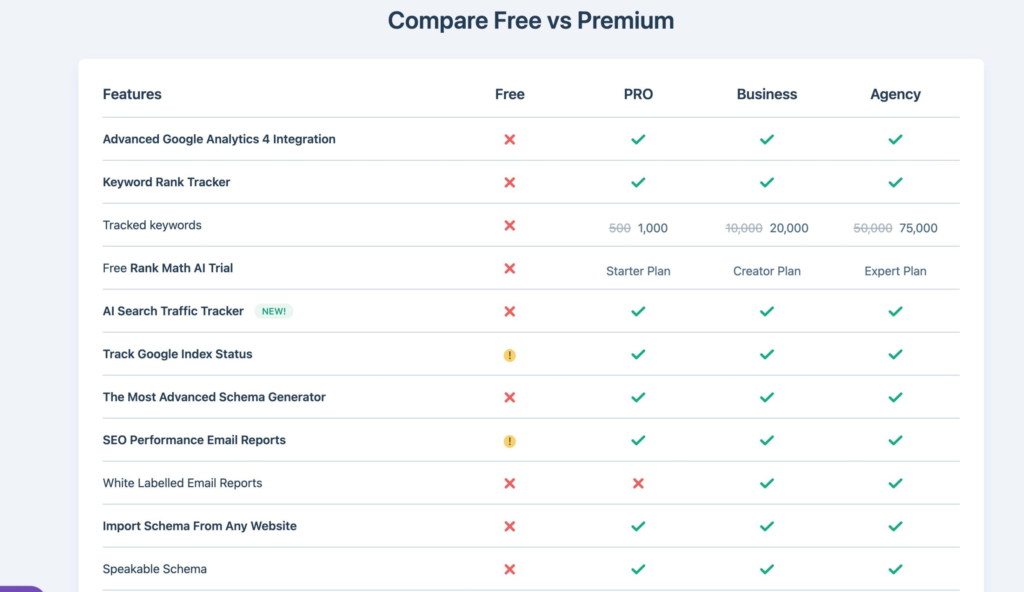
Image Source: Rankmath
With Rank Math Free, you can:
- Optimize your posts and pages for SEO
- Add SEO titles and meta descriptions
- Generate XML sitemaps
- Add Schema markup
- Manage redirects
- Perform SEO analysis
- Optimize WooCommerce pages
- Connect your website with Google Search Console and Analytics
- Use a variety of built-in SEO modules
This makes the free version a practical starting point for website owners who want to improve their website’s SEO without having to pay for a premium plugin right away.
Rank Math PRO is designed for users who require more advanced SEO tools, features, and reporting capabilities.
Depending on the selected plan and available features, PRO provides additional capabilities such as:
- Keyword rank tracking
- Advanced Schema features
- Advanced local SEO functionality
- Advanced WooCommerce SEO
- SEO performance reporting
- AI Link Genius
- Automated internal linking capabilities
- Additional advanced SEO tools
For example, a blogger who only needs basic on-page SEO may find the free version sufficient. On the other hand, SEO professionals, agencies, or growing businesses that require rank tracking, advanced reporting, or greater automation may find PRO more suitable.
2.2 WP Rocket: Premium Performance Optimization
WP Rocket is a premium WordPress performance plugin designed to improve website loading speeds and Core Web Vitals. It uses caching along with various optimization techniques to reduce the amount of processing required by browsers and servers when loading web pages.
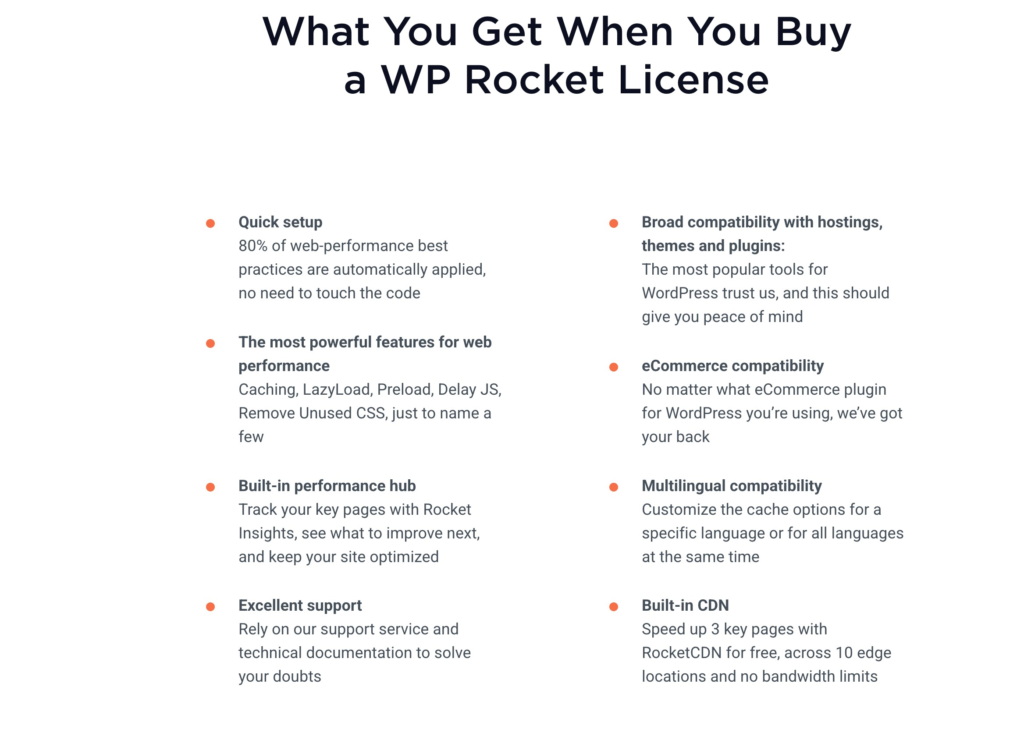
Image Source: Rankmath
Unlike freemium plugins that provide a free version along with the option to upgrade to a paid plan, WP Rocket is a premium plugin.
It offers a range of features designed to improve website performance in areas such as:
- Page caching
- Browser caching
- Cache preloading
- File optimization
- CSS optimization
- JavaScript optimization
- Lazy loading
- Database optimization
- Content delivery network integration
WP Rocket is an example of a plugin where users pay for a dedicated website performance optimization solution instead of starting with a free version and upgrading to a premium plan later.
2.3 Wordfence: Free vs Premium Security
Wordfence is a WordPress security plugin designed to help protect websites from malware, malicious traffic, login attacks, and other security threats.
It is available as a free plugin, with additional features and capabilities provided through its premium plans.
The free version includes several important security features, including:
- Web application firewall
- Malware scanning
- Login security
- Brute-force protection
- Security monitoring
- Two-factor authentication
- Protection against suspicious traffic
These features can provide an additional layer of security for blogs, business websites, and other WordPress websites.
Unlike freemium plugins that provide a free version along with the option to upgrade to a paid plan, WP Rocket is a premium plugin.
It offers a range of features designed to improve website performance in areas such as:
- Page caching
- Browser caching
- Cache preloading
- File optimization
- CSS optimization
- JavaScript optimization
- Lazy loading
- Database optimization
- Content delivery network integration
WP Rocket is an example of a plugin where users pay for a dedicated website performance optimization solution instead of starting with a free version and upgrading to a premium plan later.
2.4 Wordfence: Free vs Premium Security
Wordfence is a WordPress security plugin designed to help protect websites from malware, malicious traffic, login attacks, and other security threats.
It is available as a free plugin, with additional features and capabilities provided through its premium plans.
The free version includes several important security features, including:
- Web application firewall
- Malware scanning
- Login security
- Brute-force protection
- Security monitoring
- Two-factor authentication
- Protection against suspicious traffic
These features can provide an additional layer of security for blogs, business websites, and other WordPress websites.
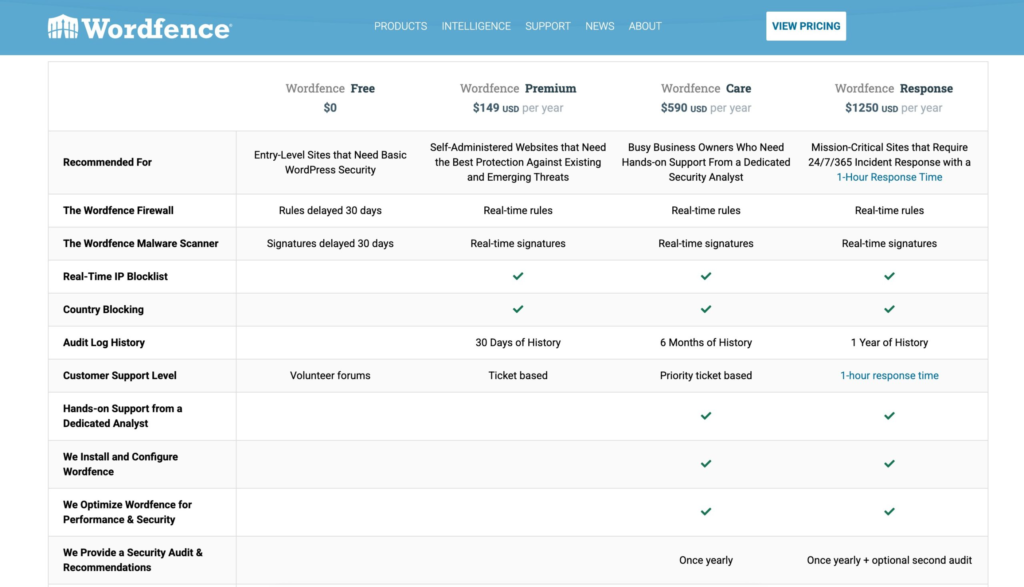
Image Source: Rankmath
The premium version adds additional security capabilities and access to features such as real-time firewall and malware protection updates, IP blocklisting, and other advanced security functionality.
A small website with straightforward security requirements may find the free version sufficient. Websites that need more advanced protection or faster access to certain security updates may consider the premium version.
2.5 UpdraftPlus: Free vs Premium Backups
UpdraftPlus is a WordPress backup and restoration plugin. It allows website owners to create backups of their WordPress files and database and store them remotely.
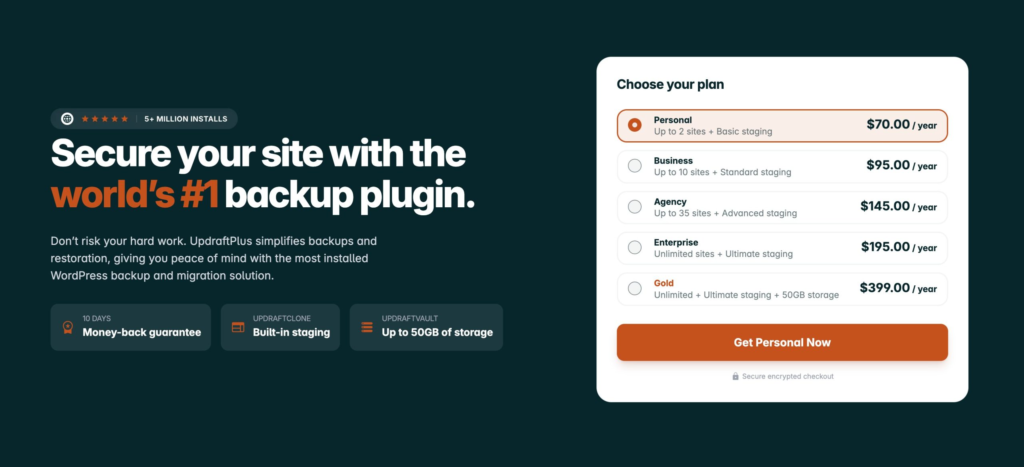
Image Source: Rankmath
Backups are especially important because they allow you to restore your website if something goes wrong during an update, migration, plugin installation, or any other major change.
The free version includes the basic backup features you need, such as:
- Manual backups
- Scheduled backups
- Website restoration
- Database backups
- File backups
- Remote storage options
For a small website that requires regular backups, these features may be sufficient.
The premium version offers more advanced features, which may include:
- Incremental backups
- Automatic backups before updates
- Additional remote storage options
- Advanced migration and cloning tools
- Greater control over the backup process
- Premium support
This difference becomes more important for larger websites or users who regularly manage migrations, updates, or multiple websites.
For a personal blog, the free version may provide all the backup features you need. However, for an agency or business managing more complex websites, the additional automation and migration features can be valuable.
2.6 Elementor: Free vs PRO
Elementor is a visual page builder that allows users to create and customize WordPress pages using a drag-and-drop interface.
Instead of designing pages completely with code, you can use Elementor’s visual editor to arrange content, images, buttons, columns, and other elements.
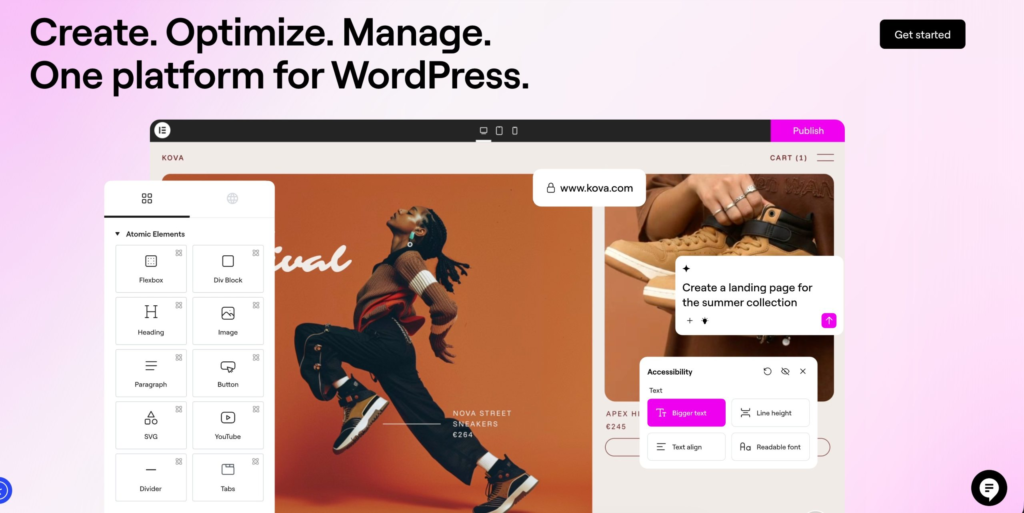
Image Source: Rankmath
The free version provides the essential page-building experience.
You can use it to:
- Create custom page layouts
- Add different content elements
- Design pages visually
- Customize page layouts
- Build landing pages
- Make responsive design adjustments
For users who need basic control over individual page layouts, the free version may be sufficient.
Elementor Pro extends the page builder with additional design and website-building capabilities.
Depending on the plan, users can access features such as:
- Additional widgets
- Theme Builder
- Dynamic content
- Popup Builder
- Form Builder
- WooCommerce Builder
- Additional templates
- Advanced design controls
For a simple website where you only need to create a few custom pages, Elementor Free may be sufficient. However, if your website requires custom headers, footers, templates, popups, dynamic content, or more advanced WooCommerce designs, Elementor Pro provides additional tools and features.
Frequently Asked Questions
Are free WordPress plugins safe to use?
Yes, free WordPress plugins can be safe to use, but it is important to evaluate them before installing them. Check their update history, number of active installations, user reviews, developer reputation, compatibility with your WordPress version, and how quickly security issues are addressed.
Are paid WordPress plugins better than free plugins?
Not necessarily. Paid plugins may offer additional features, customer support, integrations, or other benefits, but this does not mean you always need to purchase them.
Do free WordPress plugins slow down websites?
Not necessarily. A plugin’s performance depends on how well it is developed and the functionality it provides, rather than whether it is free or paid. Installing too many plugins or using multiple plugins that perform similar functions can create unnecessary overhead and affect website performance.
Should I install a free plugin before buying the premium version?
If a free version is available, trying it before purchasing the premium version can be a good approach. It allows you to check whether the plugin works properly with your theme, other plugins, and overall website setup.
You can then decide whether the additional premium features provide enough value to justify the cost.

Sikheya Digital Hub is a digital marketing institute and agency helping students, entrepreneurs and businesses learn and implement digital marketing, AI, social media marketing, SEO and online growth strategies.
Expertise
Digital Marketing
SEO
Social Media Marketing
Meta Ads
Google Ads
AI & Automation
Content Marketing