What Is Programmatic SEO? Examples + How to Do It
What is Programmatic SEO?
Programmatic SEO is the process of using automation to create and publish a large number of web pages that are designed to rank on search engines for different keywords and search queries.
Instead of creating every page manually, businesses use templates, structured data, APIs, databases, or other automated systems to generate multiple pages at scale.
These pages are usually created to target highly specific search queries and provide relevant information to users.
How Does Programmatic SEO Work?
A simple Programmatic SEO process looks like this:
Keyword/Search Query → Template → Data → Automated Page → Search Engine Ranking
For example, an e-commerce website could automatically create separate pages for:
- Women’s Cotton Suits
- Women’s Cotton Suits in Jalandhar
- Women’s Cotton Suits Under ₹999
- Punjabi Suits for Women
- Party Wear Suits for Women
Each page can target a specific search query while following the same basic page structure.
Where is Programmatic SEO Used?
Programmatic SEO is commonly used by businesses that have large amounts of products, locations, services, or other structured data.
Common examples include:
- Travel Websites – destination, hotel, flight, and travel pages
- Real Estate Platforms – property and location-based pages
- E-commerce Websites – product, category, and comparison pages
- Job Platforms – jobs by role, company, or location
- Directories & Marketplaces – business and service pages
Examples of Companies Using Programmatic SEO
Many successful websites use Programmatic SEO to create thousands or even millions of targeted pages.
Some well-known examples include:
- Travel platforms creating pages for different destinations and hotels
- Real estate websites creating pages for properties and locations
- E-commerce platforms creating pages for products and categories
- Job websites creating pages for specific job roles and locations
Important Note
Programmatic SEO is not simply about creating thousands of pages.
The pages should provide useful, unique, and relevant information to users. Creating large numbers of low-quality or repetitive pages can negatively affect a website’s search performance.
In simple words:
Programmatic SEO = Using automation + data + templates to create many useful SEO-focused pages at scale.
Yelp – A Programmatic SEO Example
Yelp is an online business directory that uses Programmatic SEO to create a large number of useful pages for different cities, businesses, and categories.
For example, Yelp has pages for 150+ cities, and within each city, users can explore different business categories such as:
- 🍽️ Restaurants
- 🛍️ Shopping
- 🌃 Nightlife
- 💇 Beauty & Salons
- 🏨 Hotels
- 🔧 Local Services
How Does Yelp Use Programmatic SEO?
Yelp can combine location + business category to create highly specific pages.
For example:
City + Category → SEO Page
- Restaurants in New York
- Shopping in Chicago
- Nightlife in Los Angeles
- Restaurants in San Francisco
Instead of manually creating every page from scratch, a website like Yelp can use templates and its business database to generate many location- and category-specific pages.
Simple Example
Imagine we create a similar website for India:
Jalandhar + Restaurants → Restaurants in Jalandhar
Jalandhar + Salons → Salons in Jalandhar
Ludhiana + Restaurants → Restaurants in Ludhiana
Amritsar + Hotels → Hotels in Amritsar
This is the basic idea behind Programmatic SEO: using structured data and templates to create many relevant pages targeting specific searches.
Key Learning
Programmatic SEO helps businesses create many targeted SEO pages at scale by combining templates with structured data.
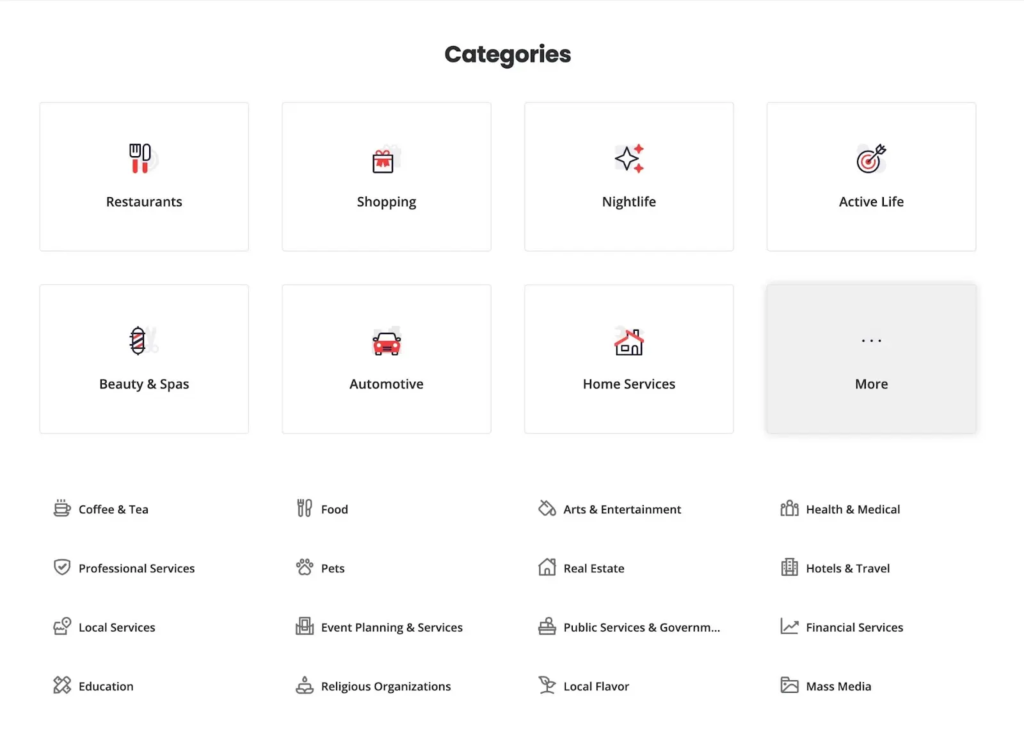
Image Source: Semrush
For each city, Yelp programmatically creates pages such as “Restaurants in New York” or “Shopping in Phoenix.” Each page contains a list of relevant businesses along with details such as addresses, business hours, ratings, and other business information.
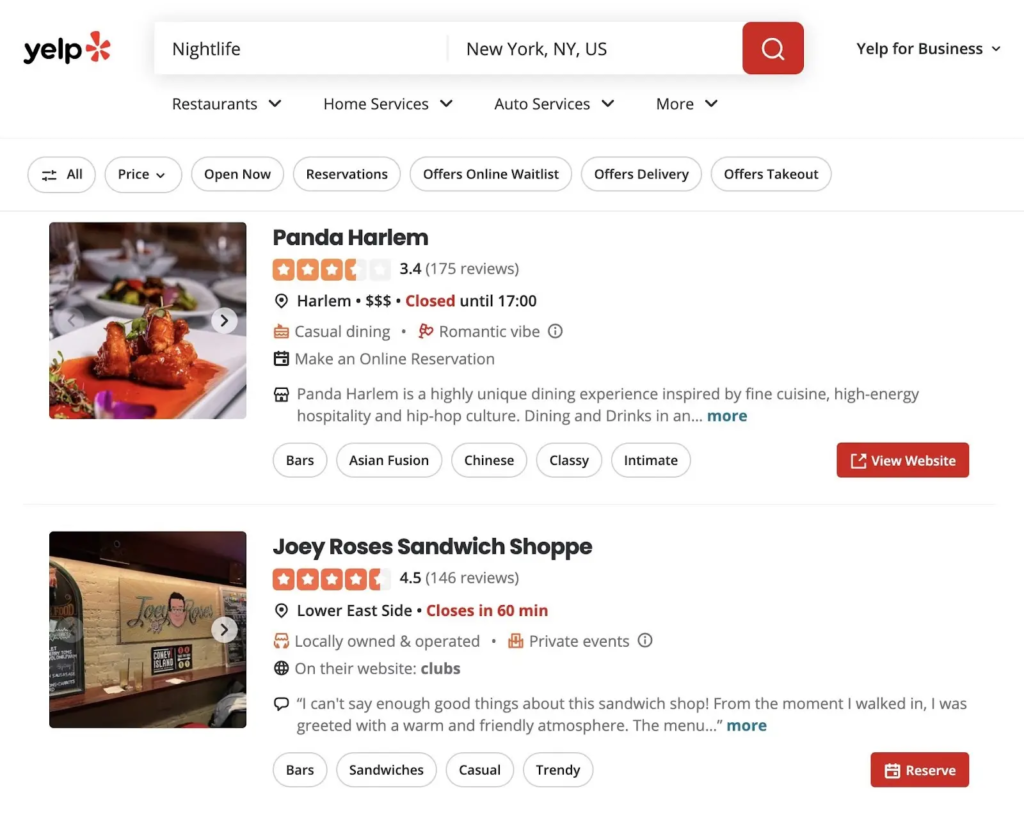
Image Source: Semrush
Users can click on a business listing to visit a dedicated Yelp page for that business. These individual business pages are also created programmatically and include important information such as business details, photos, ratings, and customer reviews.
Yelp also allows businesses to claim and update their own listings, helping keep the information on these pages more detailed and up to date.
Tripadvisor
Tripadvisor is a travel-planning website that provides travel guides, hotel listings, restaurant reviews, attractions, and other travel information. A large part of its content strategy uses Programmatic SEO.
For example, Tripadvisor creates “Things to Do in [City]” pages for different cities. These pages list popular attractions, sightseeing spots, activities, and experiences, helping tourists discover what they can do and plan their time in a particular city.
Example:
- Things to Do in Dubai
- Things to Do in Paris
- Things to Do in Jaipur
- Things to Do in Goa
This allows Tripadvisor to create many location-specific pages that target people searching for travel information about different destinations.
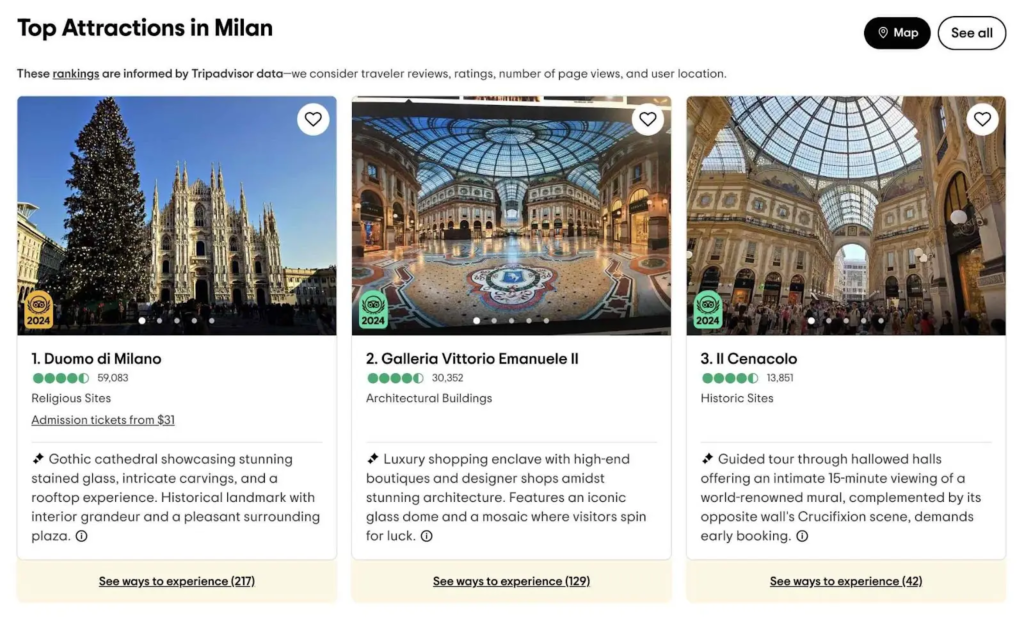
Image Source: Semrush
From these pages, users can click on any attraction to visit a dedicated page with detailed information about the attraction, along with a link to book admission tickets when available.

Image Source: Semrush
Wise
Wise is a fintech company that provides money transfer and currency conversion services for individuals and businesses. It uses Programmatic SEO to target long-tail keywords, which are highly specific search terms related to currency conversions, such as “USD to EUR.”
For different currency combinations, Wise creates dedicated pages that provide useful information related to that specific conversion.
Each page typically includes:
- Currency conversion tool – to convert one currency into another
- Conversion chart – showing how the exchange rate has changed over time
- Conversion guide – explaining how to convert currencies using Wise
- Internal links – connecting users to other currency conversion pages on the website
Simple Example
A user searches for:
“USD to EUR”
They can land on a Wise page specifically designed for that search query, where they can check the exchange rate, convert currencies, view historical rates, and explore other currency conversions.
This is a good example of how Programmatic SEO can combine templates + data + specific search queries to create many useful pages at scale.

Image Source: Semrush
Pros and Cons of Programmatic SEO
When done correctly, Programmatic SEO can help a website rank for many relevant keywords and increase organic (unpaid) traffic.
Advantages of Programmatic SEO
1. Greater Visibility
Programmatic SEO allows you to create pages targeting many specific, long-tail keywords.
For example:
- Best digital marketing course in Jalandhar
- Digital marketing course for beginners
- Digital marketing course for students
- Digital marketing course with placement
More relevant pages can help your website appear in more search results and potentially bring more visitors and customers.
2. Scalability
Programmatic SEO makes it possible to create dozens, hundreds, or even thousands of pages using templates and structured data.
Instead of creating every page manually, you can use the same page structure with different information.
3. Efficiency
Once you have:
- A page template
- Relevant keywords
- Reliable data
- A system to generate pages
You can create many pages much faster than creating each page manually.
4. Competitive Advantage
Many businesses do not use Programmatic SEO effectively.
If you identify a useful search opportunity and create high-quality pages at scale, you may be able to reach search queries that your competitors are not targeting.
Risks and Disadvantages of Programmatic SEO
Programmatic SEO can be powerful, but creating a large number of pages does not automatically mean better SEO.
1. Low-Quality Pages & Google Spam Policies
If you create thousands of pages that provide little or no useful information, those pages may be considered low quality or spam.
For example, creating hundreds of pages by simply changing the city name while keeping everything else identical may not provide real value to users.
The goal should be quality + usefulness, not just quantity.
2. Indexation Issues
If many pages are extremely similar, search engines may consider some of them duplicates or near-duplicates.
As a result, not every page may be indexed and eligible to appear in search results.
3. Technical Complexity
Programmatic SEO often requires knowledge of technical SEO, including:
- Structured data
- Internal linking
- XML sitemaps
- Website architecture
- Indexing
- Page templates
It also requires ongoing maintenance to keep information accurate and prevent issues such as broken links or outdated data.
How to Get Started with Programmatic SEO
If you want to start a Programmatic SEO project, follow these basic steps:
Step 1: Perform Keyword Research
First, identify the long-tail keywords you want to target.
A long-tail keyword is usually a more specific search query.
Example:
Head Term:
Digital Marketing
Modifiers:
- for beginners
- for students
- in Jalandhar
- with placement
- online
This can create more specific keywords such as:
- Digital marketing course for beginners
- Digital marketing course for students
- Digital marketing course in Jalandhar
- Online digital marketing course with placement
Why Target Long-Tail Keywords?
Long-tail keywords often have lower search volume than broad keywords, but they can be more specific to what the user is looking for.
With Programmatic SEO, creating pages for smaller search opportunities can become practical because the pages are generated using a structured system.
Step 2: Find Multiple Keyword Opportunities
Use an SEO keyword research tool to discover relevant search queries.
For example, you can start with a keyword such as:
“marketing definition”
A keyword research tool can then provide many related keyword ideas.
You can analyze:
- Search volume
- Keyword difficulty
- Search intent
- Related keywords
- Long-tail variations
From this list, select keywords that are relevant to your business and useful for your audience.
Simple Example for Students
Imagine Sikheya wants to create pages around digital marketing courses.
Instead of creating only one page:
Digital Marketing Course
You could identify multiple specific searches:
- Digital Marketing Course for Beginners
- Digital Marketing Course for Students
- Digital Marketing Course in Jalandhar
- Online Digital Marketing Course
- Digital Marketing Course with Placement
If these searches have meaningful differences and you can provide useful, unique information on each page, they can become potential programmatic SEO opportunities.
Remember:
Programmatic SEO is not about creating thousands of pages just for the sake of ranking. It is about creating useful, relevant pages at scale using automation, templates, and structured data.
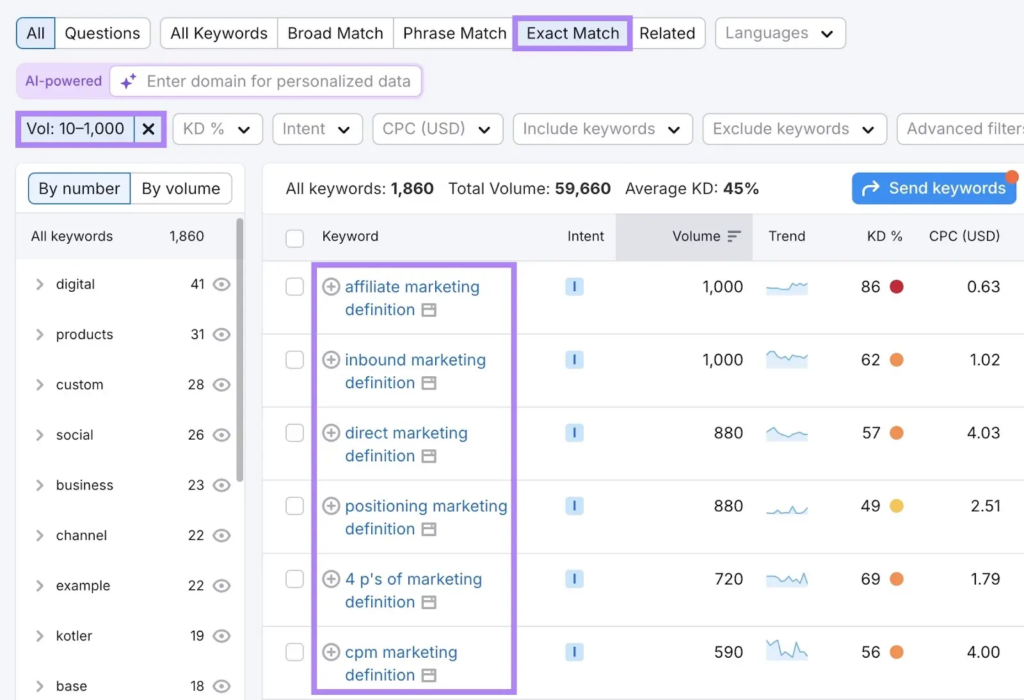
Image Source: Semrush
Step 2: Collect Data
Once you have identified the keywords and pages you want to create, the next step is to collect the data needed to build those pages.
There are three common ways to collect data:
1. Web Scraping
Web scraping means using a tool or script to collect publicly available information from websites.
For example, you may collect:
- Business names
- Prices
- Locations
- Product information
- Ratings
However, you must follow the website’s rules and applicable laws. Web scraping can also require technical knowledge, so beginners may need help from a developer.
2. APIs
An API allows one software system to get data from another system in a structured way.
For example:
- Google Places API → Local business information
- OpenWeather API → Weather information
APIs are especially useful when you need information that changes frequently or needs to be updated automatically.
This method may also require a developer to set up the connection.
3. Manual Research
Sometimes the information you need is not easily available through scraping or APIs.
In that case, you can research the information manually using reliable and credible sources.
For example, if Sikheya wants to create pages explaining different digital marketing terms, the team can research trusted sources and write accurate definitions in their own words.
How to Find Reliable Data Sources?
If you’re not sure where to find the right information:
- Search for your target keyword on Google.
- Look at the top-ranking pages.
- Identify the sources they frequently reference.
- Verify the information using credible sources.
- Use the information to create your own useful content.
Step 3: Build a Database
After collecting your data, the next step is to organize it in a database.
Think of the database as a master spreadsheet containing all the information needed to create your programmatic pages.
Your database can include fields such as:
| Field | What it means |
|---|---|
| Title Tag | The title that can appear in search results and browser tabs |
| H1 | The main heading of the webpage |
| Meta Description | A short summary of the page that may appear in search results |
| Body Text | The main content of the webpage |
| Keyword | The search query the page is targeting |
| URL | The webpage’s address |
Simple Example
Imagine we want to create pages for different digital marketing courses:
| Keyword | Title Tag | H1 | Meta Description |
|---|---|---|---|
| Digital Marketing Course | Digital Marketing Course | Digital Marketing Course | Learn digital marketing skills… |
| Digital Marketing Course for Beginners | Digital Marketing Course for Beginners | Digital Marketing Course for Beginners | Start learning digital marketing… |
| Online Digital Marketing Course | Online Digital Marketing Course | Online Digital Marketing Course | Learn digital marketing online… |
Once this information is organized, a template or automated system can use the database to create multiple webpages.
What Tool Can You Use?
You don’t need a complicated database when you’re starting.
You can begin with:
- Google Sheets
- Airtable
- Excel
- A proper database system for larger projects
For beginners, Google Sheets is one of the easiest options.
Simple Process
Keywords → Collect Data → Organize Data in Spreadsheet → Create Template → Generate Pages
The database is the foundation of Programmatic SEO because it stores the information that your templates will use to create multiple webpages.
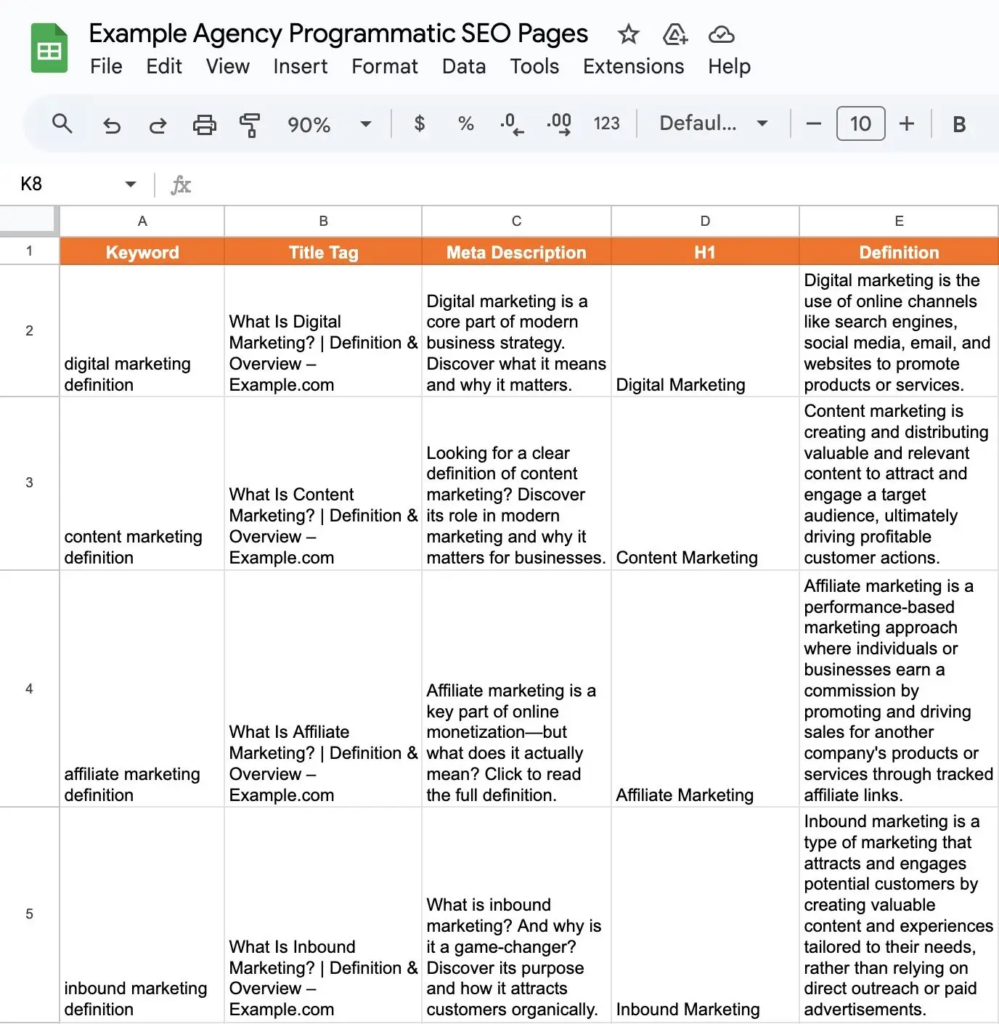
Image Source: Semrush
Using ChatGPT to Build Your Database
You can also use ChatGPT to help you fill information into your spreadsheet and organize your data faster.
For example, ChatGPT can help you:
- Generate draft content
- Create page titles
- Write meta descriptions
- Organize information
- Create content variations
- Format data for your spreadsheet
Important: Always review and edit AI-generated content before publishing it.
Check that the information is accurate, useful, up to date, and matches your brand voice.
For Larger Projects
If you are working with a large number of pages, a simple spreadsheet may not be enough.
Larger projects may use:
- SQL databases → Suitable for medium- to large-scale projects
- BigQuery → Useful for large enterprise datasets
- Snowflake → Another option for enterprise-level data management
For beginners, however, Google Sheets is usually enough to understand and start learning the process.
Step 4: Generate Webpages
Once your database is ready, the next step is to turn that data into actual webpages.
The exact process depends on the CMS (Content Management System) you are using.
For example, if your website uses WordPress, you can use tools such as WP All Import to create pages from your database.
Basic Process
Google Sheets → Download as CSV → Upload to WordPress → Map the Data → Generate Pages
For example, your spreadsheet might contain:
| Keyword | Title | H1 | Description |
|---|---|---|---|
| Digital Marketing Course | Digital Marketing Course | Digital Marketing Course | Learn digital marketing… |
| SEO Course | SEO Course | SEO Course | Learn SEO from beginners… |
| Social Media Course | Social Media Course | Social Media Course | Learn social media marketing… |
You can export this spreadsheet as a CSV file and import it into your WordPress website.
The import tool can then use the information from each row to create individual webpages.
Simple Example
Imagine your spreadsheet has 100 rows.
Instead of manually creating 100 pages one by one, your system can use:
One Page Template + 100 Rows of Data = 100 Webpages
This is the core idea behind Programmatic SEO.
Create the template once, organize your data, and use automation to generat
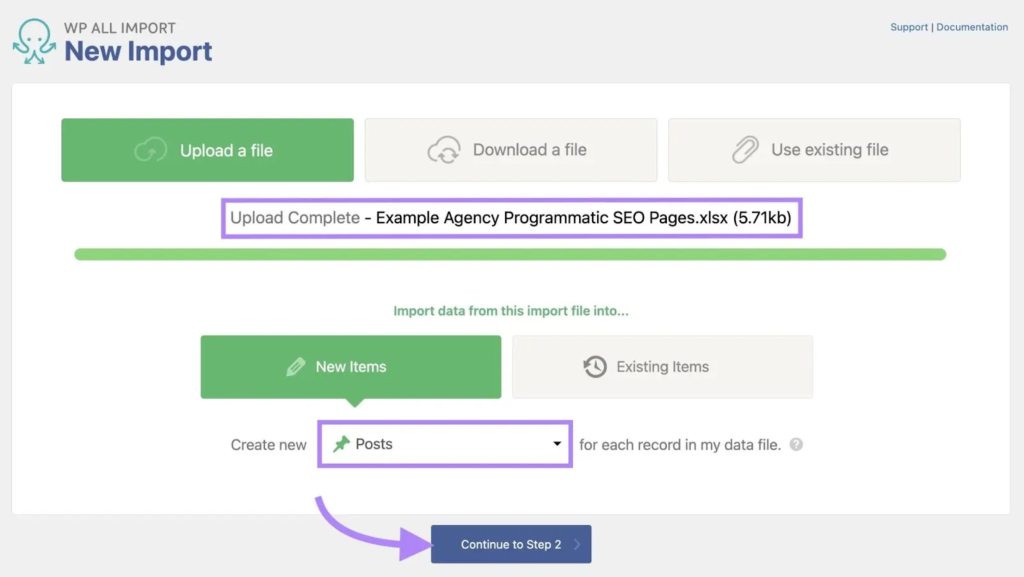
Image Source: Semrush
Continue to Step 3
After uploading your CSV file, click “Continue to Step 3.”
You will then see a drag-and-drop interface where you can connect each column from your spreadsheet to the correct field in WordPress.
For example, if your spreadsheet contains:
- H1 → Main heading of the page
- Definition → Main content or definition
You would map the “H1” column to the WordPress H1 field and the “Definition” column to the appropriate content field.
Simple Example
Spreadsheet
| H1 | Definition |
|---|---|
| What is SEO? | SEO is the process of improving… |
| What is PPC? | PPC is a form of online advertising… |
WordPress Page
H1: What is SEO?
Content: SEO is the process of improving…
The same template can then be used to create many pages automatically from your spreadsheet data.
In simple words: Mapping means telling WordPress where each piece of spreadsheet data should appear on the webpage.
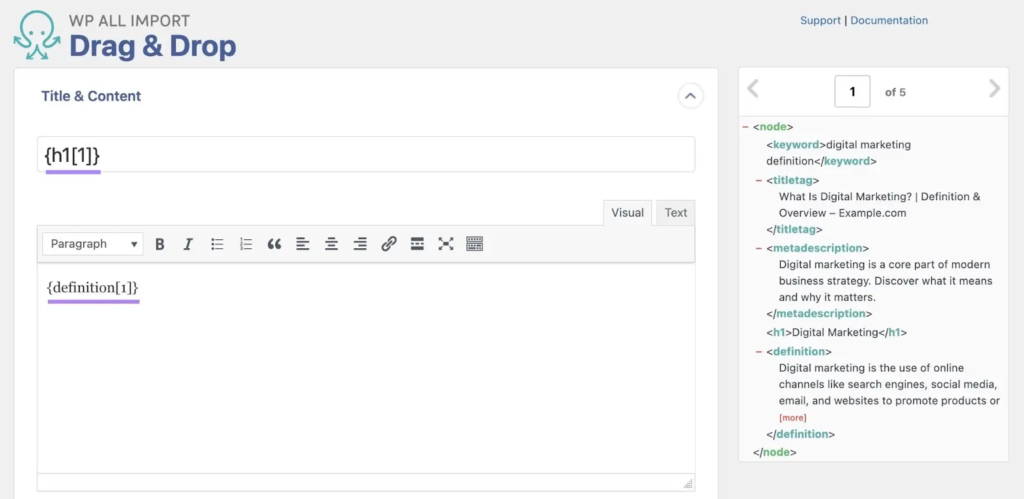
Image Source: Semrush
Mapping SEO Fields
For SEO fields such as the Title Tag and Meta Description, you may need to set up Custom Fields in WordPress.
If you are already using Yoast SEO to optimize your website content, the tool can automatically detect these SEO fields.
Simply click “See Detected Fields” under Custom Fields. You can then map the relevant columns from your spreadsheet to the corresponding SEO fields.
For example:
Spreadsheet → WordPress SEO Fields
- Title Tag → Yoast SEO Title
- Meta Description → Yoast SEO Meta Description
- H1 → Page Heading
- Body Content → Main Page Content
This mapping tells WordPress exactly where each piece of information from your spreadsheet should appear on the webpage.

Image Source: Semrush
Set a Unique Identifier
In the next step, WP All Import will ask you to set a Unique Identifier for each page.
A Unique Identifier is a value that stays the same for a specific page, even when the page is updated later.
Since the H1 heading is unlikely to change, you can use the H1 as the Unique Identifier for each page.
Once you have selected the H1 field, click “Continue.”
Generate Your Pages
Finally, click “Confirm & Run Import.”
WP All Import will then use your spreadsheet data and template to automatically generate your webpages.
In simple words:
Spreadsheet Data → Map Fields → Set Unique Identifier → Confirm & Run Import → Webpages Created
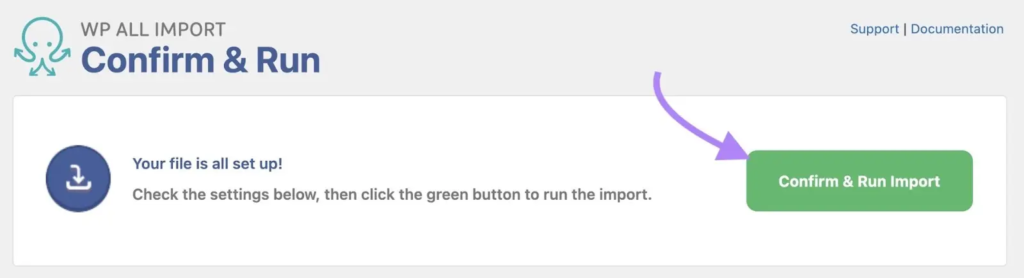
Image Source: Semrush
Generate Your Pages
Once you start the import, the plugin will automatically do the work for you.
It usually takes only a few minutes to generate all the pages. However, if you are creating a large number of pages, the process may take longer.
Implement Your Programmatic SEO Strategy
After your pages are generated, your work doesn’t stop there.
You should regularly monitor how your pages are performing in Search Engine Results Pages (SERPs).
Tools like Semrush Position Tracking can help you track the keywords you are targeting and monitor your search rankings in one place.
In simple words:
Generate Pages → Monitor Keywords → Track Rankings → Improve Pages
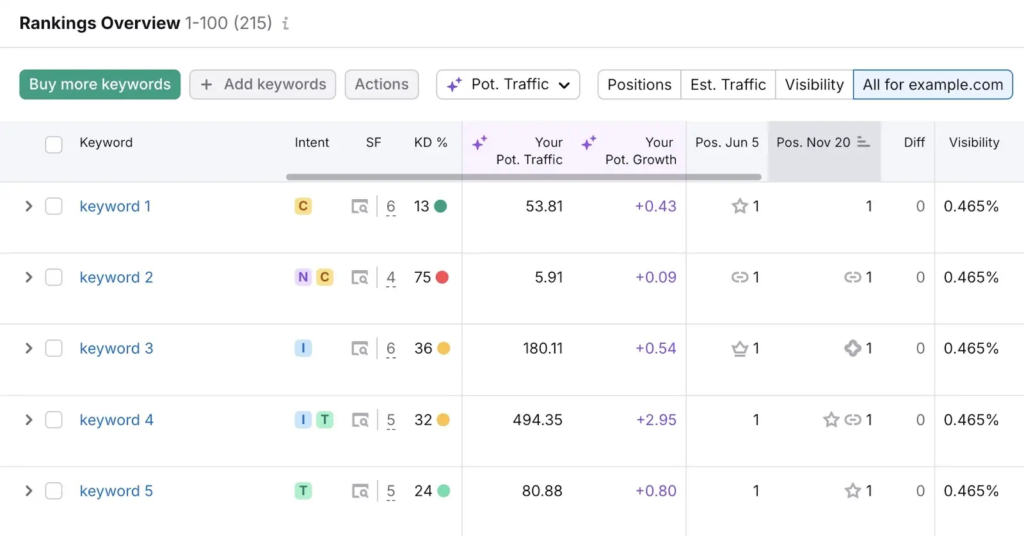
Image Source: Semrush
Final Thought
Programmatic SEO is not about creating thousands of pages just for the sake of ranking.
It is about using data, templates, automation, and smart keyword research to create many useful pages that answer specific user searches.
Remember:
Good Data + Useful Content + Right Keywords + Automation = Scalable SEO
Start small, focus on quality, monitor your results, and improve your pages over time.
The goal is not to create more pages. The goal is to create more useful pages that can reach the right audience.

Sikheya Digital Hub is a digital marketing institute and agency helping students, entrepreneurs and businesses learn and implement digital marketing, AI, social media marketing, SEO and online growth strategies.
Expertise
Digital Marketing
SEO
Social Media Marketing
Meta Ads
Google Ads
AI & Automation
Content Marketing